 Heracles Records
Coach
A coach that has read your training.
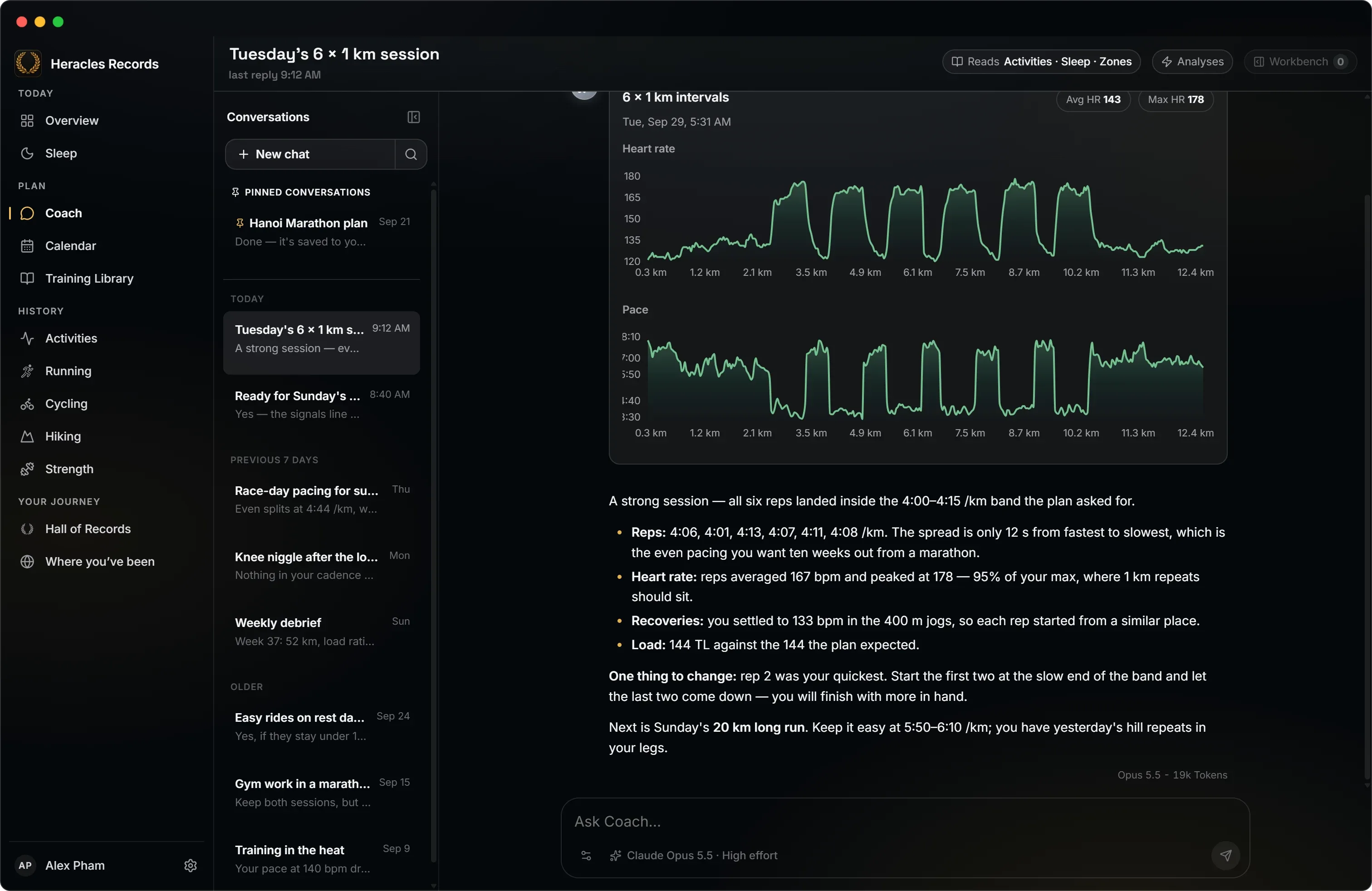
Ask about a session, a week or how well you are recovering. Coach reads your COROS data and answers with the numbers and the charts behind them. It drafts what you ask for, and changes nothing until you say so.
What Coach reads
Coach fetches what a question is about, not everything at once, and every figure it quotes comes from your COROS account.
-
Activities
Every session, its laps, zones and every channel, down to one stretch of it: the last 5 km, the third interval.
-
Trends
Training load and where it is heading, steps, exercise minutes and stress, week by week.
-
Sleep
Nights, naps, stages, HRV across the night and stress by the hour.
-
Plans and workouts
Your COROS workout library, your plans and how well you are keeping to them.
-
Zones and profile
Your own heart-rate, pace and power zones, thresholds and personal records.
-
The conversation
Earlier turns of a long conversation, searched when they matter again.
What Coach does
-
Answers with charts
Heart rate against pace, a week's load, time in zones: the figures behind the answer, drawn where they belong in it.
-
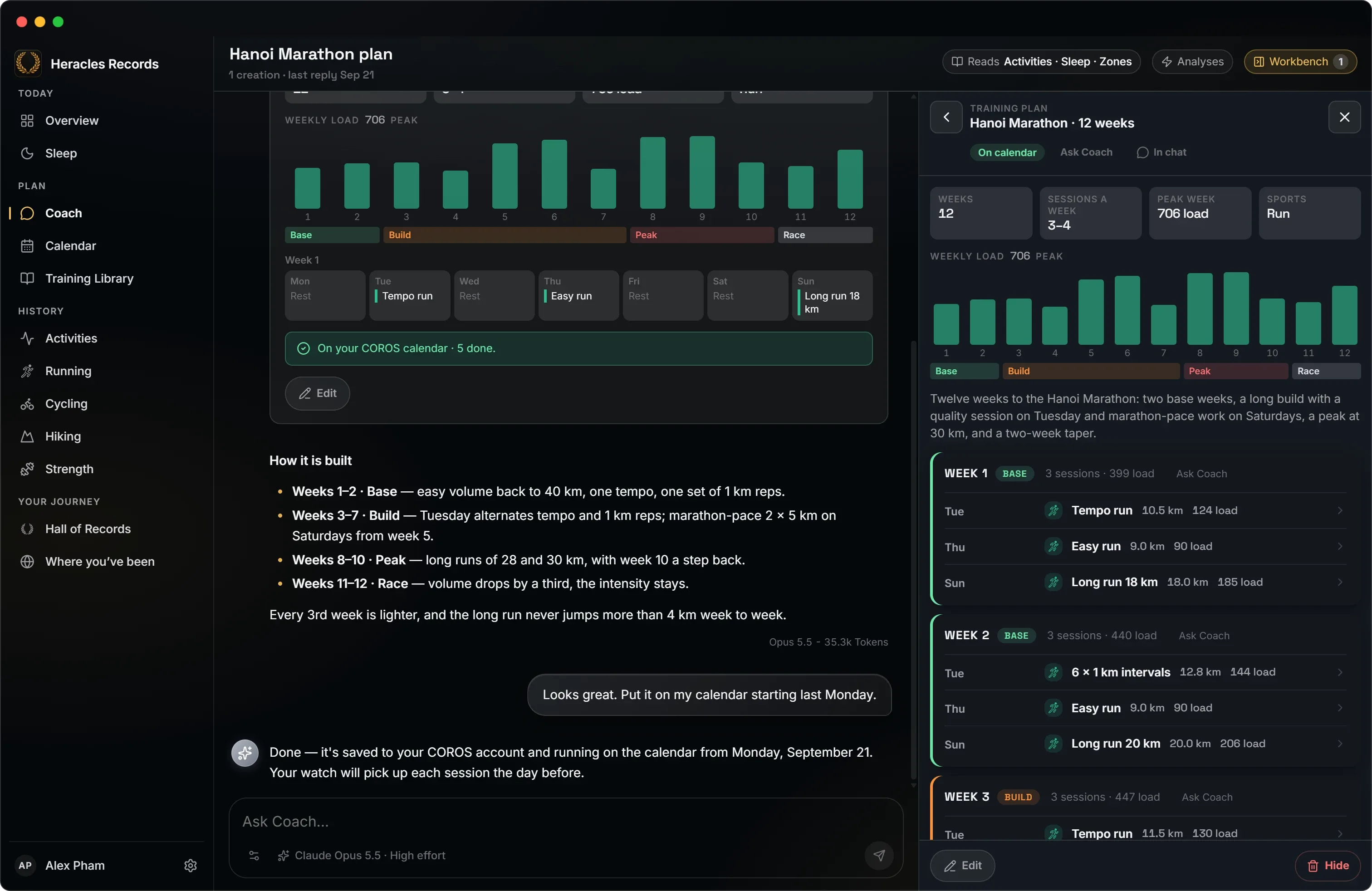
Drafts workouts
One session, built to your zones, saved to your COROS library or straight onto your calendar.
-
Writes plans with you
A plan longer than two weeks starts as a brief you can edit, then an outline, then every session. Read it in the Workbench beside the conversation, change what you like, and save it to COROS.
-
Rearranges your week
Moves, swaps, removals and additions arrive as a list. Apply them one line at a time, or all at once.
-
Checks in on its own
An auto analysis debriefs each new activity, briefs you in the morning or reviews the week, without being asked. More below.
-
Speaks your way
Friendly, Motivating, Neutral, Straight talk or No filter. Your own instructions go on top.
Auto analysis
Coach checks in on its own.
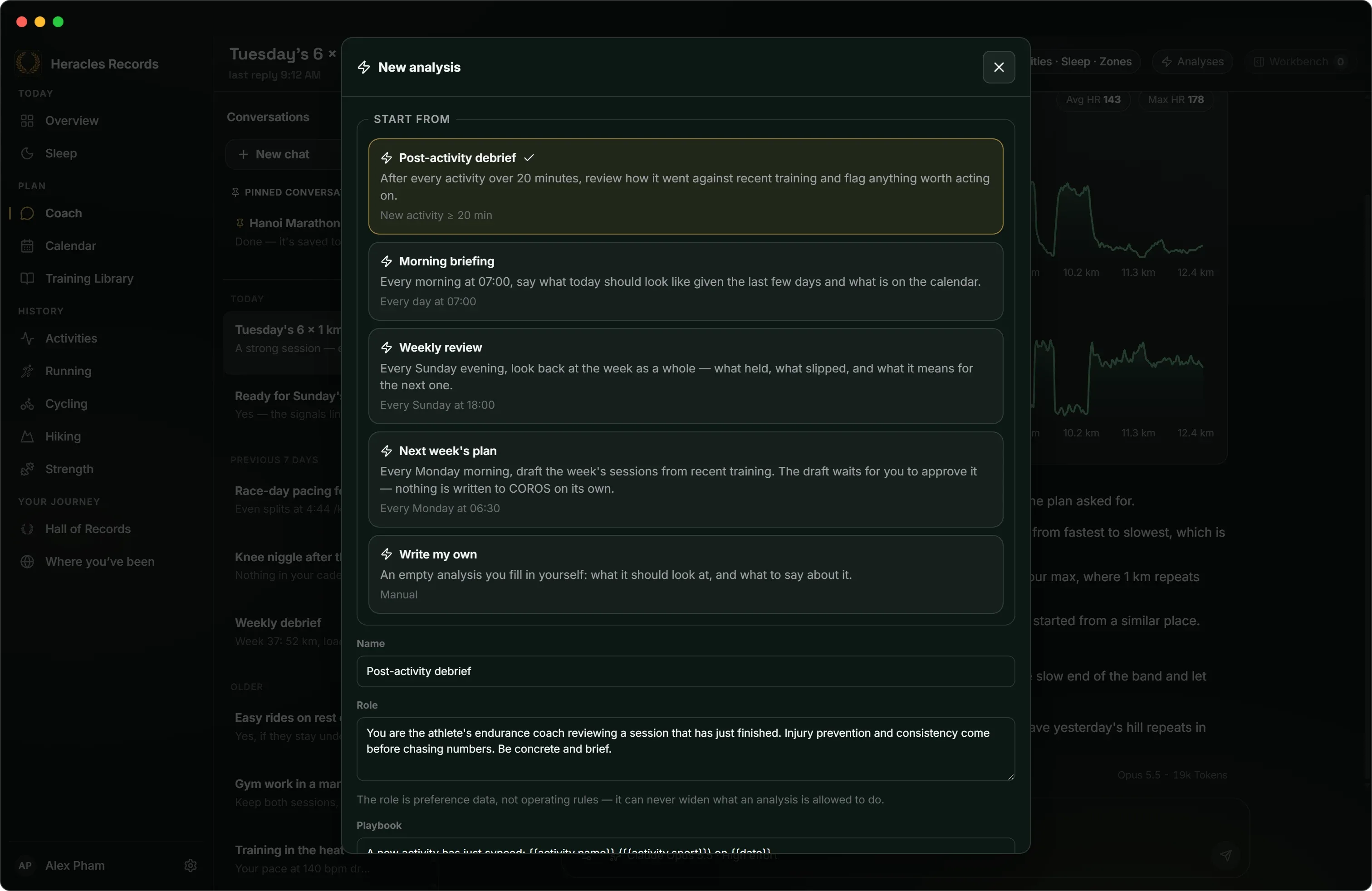
Give a conversation a standing job and Coach does it without being asked. Open Analyses at the top of a conversation, start from one of four starting points or write your own playbook, and choose when it runs. Each answer lands in that conversation, marked as an analysis, ready when you open it.
Start from
- Post-activity debrief: after every activity over 20 minutes, how it went against recent training.
- Morning briefing: at 07:00, what today should look like.
- Weekly review: on Sunday evening, what held and what slipped.
- Next week's plan: on Monday morning, the week's sessions drafted for your approval.
- Write my own: what to look at and what to say, in your words.
When it runs
- After a new activity: for the sports you pick, over a length or a distance. A debrief also reads the 72 hours before, so yesterday's leg day is part of today's run.
- On a schedule: every day or every week, at the time you set.
- When a metric turns: training load ramping, resting heart rate drifting up, a planned workout missed, or sleep debt building.
- Only when you ask: a playbook you run by hand.
Kept in bounds
- Read-only. An analysis reads and suggests. Workouts and changes it proposes wait for you to apply them.
- Guard rails. A cooldown, a cap on runs per day and quiet hours.
- A monthly budget for everything analyses spend, and one switch that pauses them all.
- One computer or any. With Sync, an analysis runs on whichever of your computers is awake, once. Or keep it to this one.
Ask from anywhere
Ask Coach sits on every session's page, on a calendar day or week, and on a plan in the Training Library. The question arrives in Coach already pointing at what it is about.
Pick the AI
Coach runs on an AI you choose, set up under Settings → Connections → Coach Models. Each conversation can use a different one.
| Provider | What you need |
|---|---|
| ChatGPT | Your ChatGPT account. You sign in through your browser. |
| Claude subscription | A paid Claude plan, and Claude Code installed on the computer. The app signs in with a Claude login of its own. |
| Claude API key | An Anthropic API key. Pay as you go. |
| OpenRouter | An OpenRouter API key, and any model it offers. |
| Local model | Ollama or LM Studio running on your computer. Free, and your questions never leave it. |
You decide what it sees
- Sources per conversation. Switch off activities, sleep or anything else a conversation should not read. It is withheld from Coach's tools and from what it is told, not only from the prompt.
- Straight to your provider. Your questions and the data they need go from your computer to the AI you picked, and nowhere else. A local model keeps them on your computer.
- Nothing saved behind your back. Drafts, plans and changes to your calendar wait on a button you press. Automatic analyses can only read.
- What each answer cost. The model and the tokens it used are under every answer, and automatic analyses have a monthly budget you set.